What Is OLAP? OLTP? OCI Autonomous Database Says: Why Not Both?
In the previous article, I covered OCI's overall advantages and its free tier. This time, let's dive deep into what I consider OCI's most powerful service — Autonomous Database (ADB).
If you've ever worked on a side project that involves data, you've definitely faced this existential question: Where should I store my data?
Excel? CSV files? Self-hosted MySQL? Google Sheets as a database? Every option comes with its own headaches — and I've experienced them all. The answer that finally stuck? A free, enterprise-grade Oracle database.
This article starts with the basics of OLAP vs. OLTP, walks through my data storage evolution, and then introduces ADB — the ultimate database solution for those of us who love free things.
First Things First: What Are OLTP and OLAP?
Before choosing a database, there's one fundamental concept you need to understand. Otherwise, even the world's best database will run slowly if you use it the wrong way.
OLTP — Transaction Processing
OLTP (Online Transaction Processing) handles "one-at-a-time everyday operations."
Imagine checking out at a convenience store: you scan a bottle of water and a lunch box. The POS system needs to create an order, deduct inventory, and update loyalty points. Each operation touches a small amount of data, but it happens at very high frequency — and every single transaction must be accurate.
Characteristics:
- High-frequency, small-volume read/write operations
- Emphasis on real-time response and consistency
- Best for: website backends, user systems, order management, APIs
- Representative databases: MySQL, PostgreSQL, Oracle ATP
OLAP — Analytical Processing
OLAP (Online Analytical Processing) handles "bulk data summarization and analysis."
Imagine an accountant preparing annual financial reports: they're not modifying individual entries, but scanning through an entire year's worth of transaction records to calculate totals, group data, and make comparisons. The data volume is massive, but update frequency is low.
Characteristics:
- Low-frequency, high-volume read operations
- Emphasis on query speed and aggregation efficiency
- Best for: reporting, data warehousing, BI dashboards
- Representative databases: BigQuery, Snowflake, Oracle ADW
Why Should You Care?
Many people don't even think about this when choosing a database. The result:
- Using an OLTP database for heavy analytical queries → painfully slow
- Using an OLAP database for real-time API queries → unacceptable latency
And most free databases only handle one side.
ADB is different. It offers two Workload Types — ADW (analytical) and ATP (transactional) — letting you choose based on your needs. And the free tier gives you two instances. More on how to choose later.
Common Misconception: "Reading Data" ≠ OLAP
Many people assume: "My application mostly reads data, so it's OLAP, right?" — not quite.
The deciding factor isn't "read vs. write," but the access pattern:
- A website API fetching "the last 30 days of prices for one stock" → small scope, needs to be fast, many concurrent users → OLTP
- An analyst running "average premium rate ranking across 2,000 stocks over the past three years" → full table scan, heavy aggregation → OLAP
Simple rule: small-scope real-time queries = OLTP, large-scope batch analysis = OLAP.
My Stock Data Storage Evolution
Before diving into ADB, let me share how I ended up here. If you've ever built a side project, this journey will feel familiar.
Stop 1: CSV — The Local Files Era
When I first started researching stock data, the most intuitive approach was saving everything as CSV files. Python's pandas to_csv() — one line, done. Simple and crude.
But problems came fast — hundreds of stocks × daily price/volume data, and soon my folder was overflowing with hundreds of CSV files. Want to find "convertible bonds with a premium rate below 5% over the past three months"? Sorry, you'll need to write loops to read files, manually filter, and pray that the file format hasn't drifted.
And don't even get me started on version management. Need to adjust a column? After the change, all old files become incompatible.
Stop 2: MySQL — The Self-Hosted Era
After getting fed up with CSVs, the natural next step was setting up a "real database." MySQL is free, well-documented, and has a huge community. Low barrier to entry.
Running it locally was definitely a step up — SQL queries, JOINs, aggregate analysis, all good.
But new problems appeared:
- Computer off = database offline. Want a daily scheduled job to fetch data? Keep your computer running 24/7
- Backups are your responsibility. The horror story of forgetting to back up and then having a hard drive crash? No thanks
- Want other services to connect? Time to configure firewalls, port forwarding, and spend hours debugging
I was spending more time "maintaining the database" than "analyzing data." Completely backwards.
Stop 3: Google Sheets — The Cloud-but-Hacky Era
If a local database is too much hassle, surely a cloud solution would work? Google Sheets is free, cloud-based, has an API, and supports collaboration. Write an Apps Script to fetch data on a schedule — looks pretty professional, right?
It was great at first. Until the data started growing —
- Sheets got slower and slower to open; even a few thousand rows started lagging
- 10 million cell limit — sounds like a lot? With dozens of columns × thousands of stocks × daily data, you'll hit the ceiling within a year
- Apps Script's execution time limit (6 minutes) and API quotas kept getting in the way
- Bottom line: Google Sheets is not a database. It's a spreadsheet
Stop 4: OCI ADB — The Final Answer
After discovering OCI, I found that the Always Free Tier includes 2 Autonomous Database instances, each with 20GB of storage.
With a "it's free, why not try?" mindset, I provisioned an ATP instance. And I never looked back:
- Fully managed: Nothing to install — provision and start querying immediately
- Automatic backups: Zero worry — Oracle handles everything
- Standard SQL: If you know MySQL, just adapt to a few syntax differences
- Web-based SQL editor: Database Actions includes SQL Worksheet — just open a browser and start writing queries
- Python / Node.js SDKs: Programmatic connections are straightforward too
And the most critical part — performance is on a completely different level. Oracle Database has decades of RDBMS optimization behind it. Even a free 1 OCPU instance runs faster than my self-hosted MySQL.
One Table Says It All
| CSV | MySQL | Google Sheets | OCI ADB | |
|---|---|---|---|---|
| Cost | Free | Free (self-hosted) | Free | Free |
| Query capability | None | SQL | Limited | Full SQL |
| Cloud access | DIY setup | |||
| Auto backup | DIY | Version history | Fully automatic | |
| Storage capacity | Disk space | Disk space | 10M cells | 20GB |
| Maintenance | Low | High | Low | Very low |
| Performance | No query engine | Moderate | Very poor | Enterprise-grade |
How Powerful (and Generous) Is Autonomous Database?
OK, so ADB is my final choice. But what makes it so great? Let me break down its core advantages.
Fully Autonomous Operations
This is where the "Autonomous" in ADB's name comes from. Traditional database management requires a DBA (Database Administrator) to handle:
- Performance tuning (Should we create an index? How to optimize the query plan?)
- Security patches
- Backup and recovery strategies
- Storage management
ADB automates all of this. All you need to do is: provision, connect, and query. Oracle handles everything else.
In one sentence: It's like hiring a DBA who works for free.
Not a Toy — It's the Enterprise Engine
Some cloud free-tier databases give you a limited "toy version." ADB is not one of them.
Under the hood, it runs the exact same Oracle Database engine used by Oracle's enterprise customers. You get access to:
- PL/SQL: Stored procedures, triggers, advanced logic
- Materialized Views: Pre-computed complex queries
- Partitioning: Table partitions for massive performance gains
- Native JSON support: Store relational data and JSON documents in the same database
These features are virtually unheard of in other free-tier offerings.
Always Free Tier Specs
| Item | Specification |
|---|---|
| Instances | 2 (each can be a different Workload Type) |
| Storage | 20GB each |
| CPU | 1 OCPU |
| Memory | ~8GB RAM |
| Built-in tools | Database Actions (Web UI + SQL Worksheet) |
Here's my ADB instance information page, showing the Workload Type, Database Version, Instance Type, and other details:
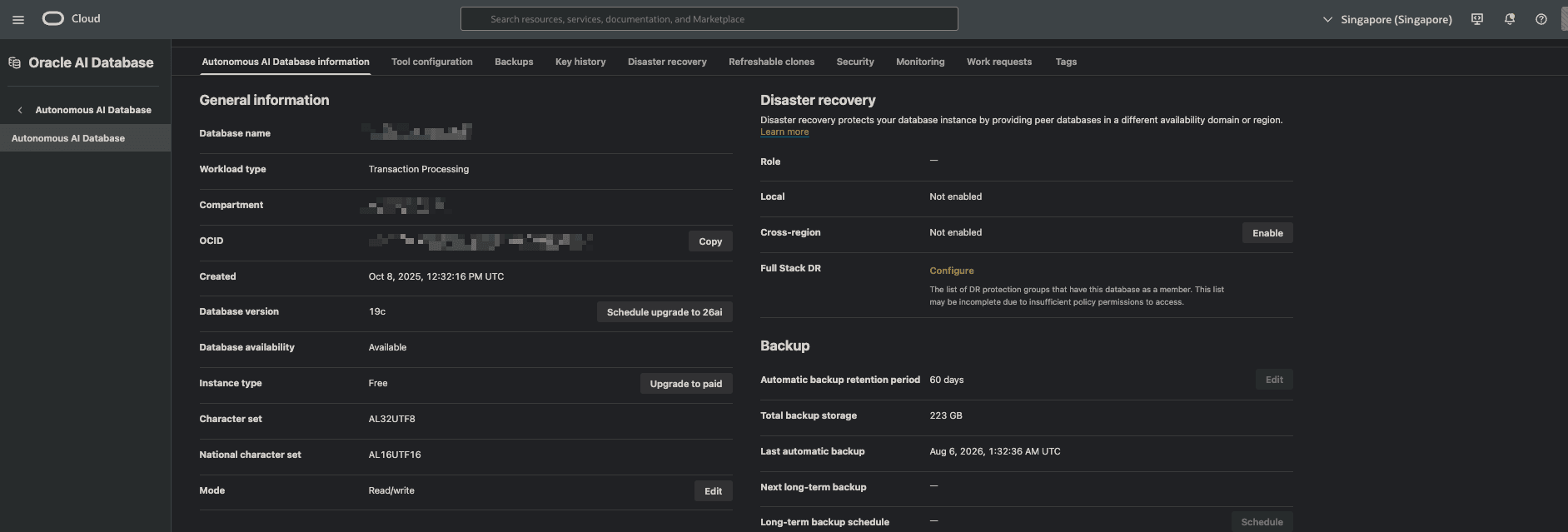 OCI Autonomous Database Console overview page
Don't underestimate 20GB — for cb lab, after years of stock data and convertible bond historical records, I've only used about 3.6 GB — less than one-fifth of the 20GB limit. I'll show you how to estimate your own data usage later.
Security Without Compromise
- TDE (Transparent Data Encryption): All data encrypted at rest by default
- Network isolation: Private Endpoints available to restrict access to your VCN
- Automatic security patching: Vulnerability fixes handled automatically
Your personal side project database gets the same security standards as enterprise customers. That's rare for a free tier.
ADW vs. ATP — Which One Should You Choose?
When provisioning ADB, you'll be asked to choose between ADW (Autonomous Data Warehouse) and ATP (Autonomous Transaction Processing).
We covered OLAP and OLTP concepts earlier — here's how they map to ADB's options:
| ADW (Data Warehouse) | ATP (Transaction Processing) | |
|---|---|---|
| Optimized for | OLAP — large data scans, reporting | OLTP — high-frequency small read/writes |
| Indexing strategy | Automatic column-based indexes | Automatic row-based indexes |
| Best for | Data warehousing, BI analytics, massive historical data | Website backends, APIs, real-time queries |
| GCP Equivalent | BigQuery | Cloud SQL |
Honest Truth: At Small Scale, They're the Same
If your data volume is small, either one works fine.
Take convertible bonds as an example — the Taiwan market generates only a few hundred new records per day. Even with all listed stocks' daily price data, that's only a few hundred thousand rows per year. At this scale, ADW and ATP perform identically — they share the same Oracle Database engine underneath, and SQL syntax is exactly the same. The difference is only in the query optimizer's strategy, which only becomes noticeable past the million-row mark.
My Choice: ATP (Honestly, by Accident)
Full disclosure: when I first provisioned ADB, I didn't even know ADW was an option, so I just created an ATP instance.
But it turned out that this "accident" had zero impact. cb lab's website API needs real-time query responses, which is exactly what ATP excels at. And with my data scale, even if I had chosen ADW, there would have been no noticeable difference.
Side Note: OLAP Schema Design on ATP
Interestingly, my underlying data model uses a Star Schema — Fact Tables for daily price/volume data, Dimension Tables for stock information and convertible bond attributes. Star Schema is a classic data warehouse (OLAP) design pattern.
But since my primary access pattern is real-time website API queries, I chose ATP. In practice, ATP handles Star Schema queries with no issues at all — after all, it's the same Oracle Database engine under the hood. How you design your schema is one thing; choosing ADW vs. ATP depends on your access pattern, not your schema structure.
Recommendation
- Not sure which to pick? → Go with ATP. More versatile — handles both OLTP workloads and small-to-medium analytical queries
- Pure analytics, reports, no API? → Go with ADW. Extra optimization for aggregate queries (SUM, GROUP BY, large scans)
- Remember: The free tier gives you 2 instances. You can always provision another one later to experiment
Is 20GB Really Enough?
Many people see "20GB" and think it sounds small. But for most side projects, 20GB is more than sufficient.
Here are my actual numbers:
cb lab has stored five years of stock historical data, convertible bond records, plus various logs and staging tables — currently totaling about 3.6 GB, less than one-fifth of the 20GB limit.
What value does this 3.6 GB of data provide?
This data stored in ADB powers cb lab's Latest Convertible Bonds List and Technical Analysis pages. You don't need massive servers — a single free ATP instance is enough to serve market data to the website quickly.
That works out to roughly 720 MB per year. At this rate, 20GB can hold over 20 more years of data.
Check Your Actual Usage with SQL
If you're already using ADB, you can check your current storage usage with this SQL:
SELECT ROUND(SUM(bytes) / 1024 / 1024, 2) AS total_mb
FROM user_segments;
I recommend checking periodically to keep track. But for a personal project, 20GB is virtually impossible to fill up.
My ADB in Action
Talk is cheap — let me show you what ADB actually looks like in practice.
Database Actions — SQL Worksheet
ADB comes with a built-in web-based SQL editor. No software installation needed — just open a browser and start writing SQL. It supports auto-complete, execution plan viewing, and result export. For those who don't want to install an IDE, this tool is more than sufficient.
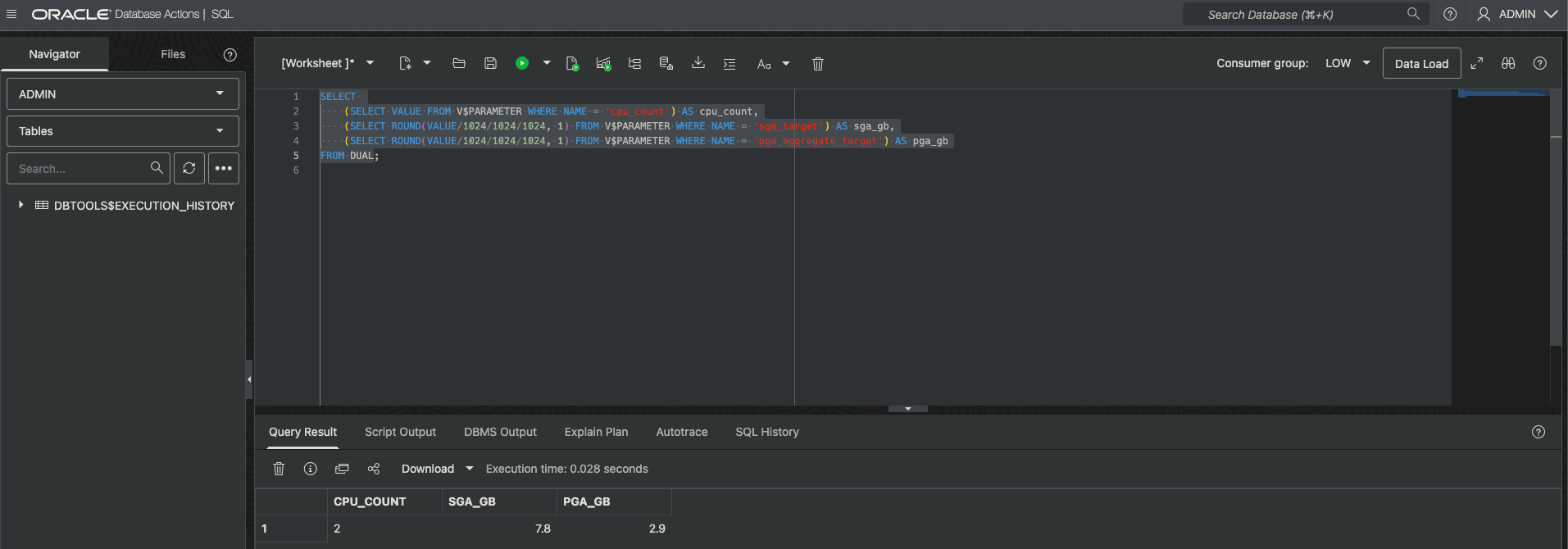 Database Actions SQL Worksheet — write SQL queries directly in the browser
Monitoring Dashboard
ADB's monitoring dashboard shows CPU utilization, storage usage, session count, and other key metrics. The Free Tier monitoring features are identical to the paid version, giving you full visibility into your database's health.
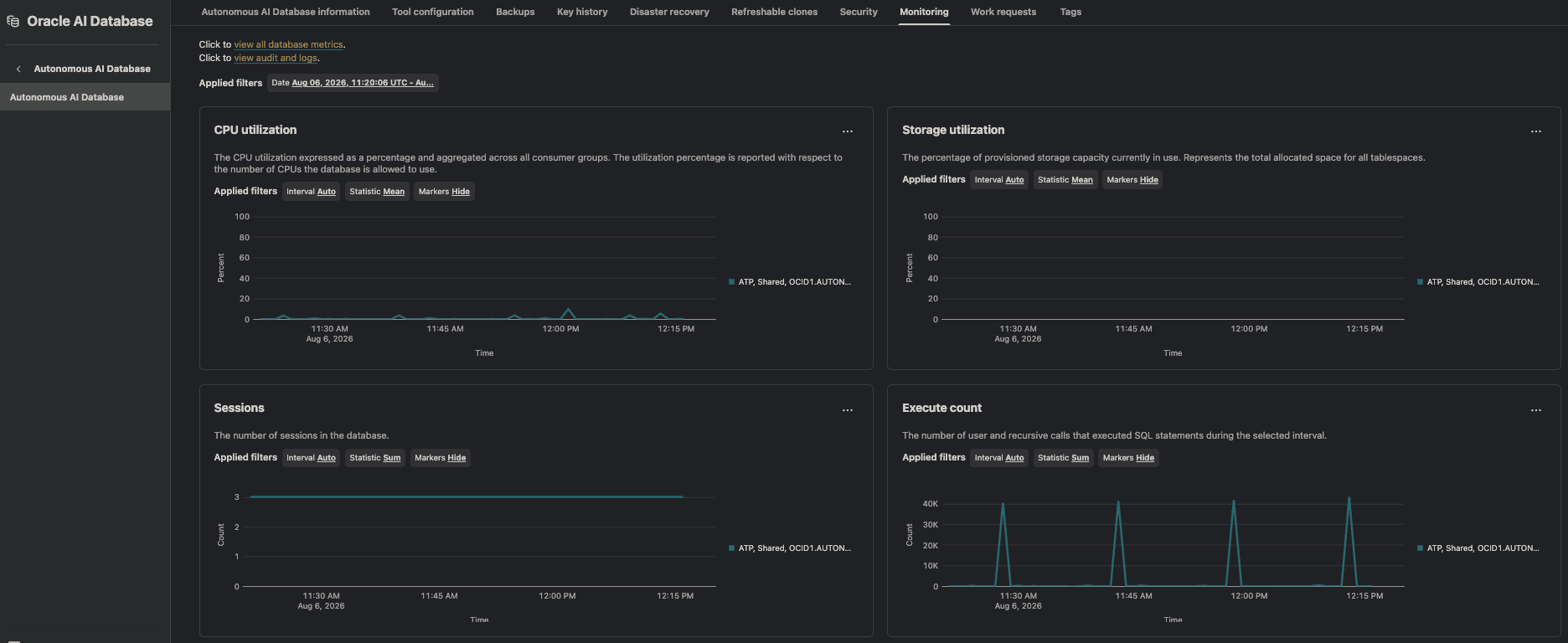 ADB Monitoring Dashboard — real-time CPU, Storage, Sessions, and Execute Count monitoring
Gotchas & Tips for Beginners
ADB is great, but there are a few pitfalls. Here's what I've encountered so you don't have to learn the hard way.
Connection: Use TLS Directly
In the early days, connecting to ADB required downloading a "Wallet" file bundle — a rather tedious setup process. The good news: Oracle has made TLS the default connection method, eliminating the need to download a Wallet and greatly simplifying the setup.
Connecting from code is also simpler now:
- Python: Use
python-oracledbin thin mode — no Oracle Client installation required - Node.js: Use the
oracledbpackage in thin mode — also no Client needed
Thin mode is the key term — it means a pure language implementation with no dependency on Oracle's native C Library. Much lighter for both installation and deployment.
Always Free Limitations
No matter how good the free tier is, it has its limits. Here's what you need to know:
- No Scale Up: Locked at 1 OCPU / ~8GB RAM. Can't increase it. But honestly, it's more than enough for personal projects
- Auto-stop after 7 days of idle: If your ADB has no connections or operations for 7 consecutive days, Oracle will automatically stop it (not delete — your data is safe). You'll need to manually restart it from the Console
- My approach: Since cb lab runs daily ETL jobs via OCI Functions to fetch stock data, the database never goes idle. If you don't have daily scheduled jobs, you can set up a simple cron job to periodically ping the database
SQL Syntax Differences
If you're coming from MySQL, PostgreSQL, or Snowflake, there are a few common syntax differences to watch out for:
| Other Databases | Oracle (ADB) |
|---|---|
LIMIT 10 | FETCH FIRST 10 ROWS ONLY |
NOW() / CURRENT_TIMESTAMP() | CURRENT_TIMESTAMP or SYSDATE |
IF(cond, a, b) / IFF(cond, a, b) | CASE WHEN cond THEN a ELSE b END |
AUTO_INCREMENT / AUTOINCREMENT | GENERATED ALWAYS AS IDENTITY |
SHOW TABLES | SELECT table_name FROM user_tables |
Don't worry too much — basic SELECT, INSERT, JOIN, and GROUP BY syntax is universal. For advanced syntax, just check the documentation. And with AI assistants available today, syntax conversion takes seconds.
Other Tips
- Timezone: ADB defaults to UTC. If you're storing data in local time (e.g., Taipei time), remember to convert during queries
- Case sensitivity: Oracle converts table and column names to uppercase by default. If you prefer lowercase naming, use double quotes (e.g.,
"my_table"), or just embrace the uppercase convention - Connection string: After provisioning ADB, click the "DB Connection" button in the Console to copy the connection string directly — very convenient
Coming Up Next
This article covered ADB's core concepts and real-world usage. But a database is just infrastructure — how do you get data into it automatically?
In the next article, I'll share how to use OCI Functions (Serverless) with FinMind open-source data, to build a fully automated stock data ETL pipeline. Daily data fetching, cleaning, and loading into ADB — no servers to maintain, and completely free.
Want to Learn More?
If you're interested in our technical architecture, check out the System Architecture page to see the Data Pipeline and real-time monitoring behind cb lab.
Join our Telegram channel to get free daily strategy data notifications.